Invoices stored in binders or in digital form across various storage locations are a thing of the past. Are you wasting time searching for them? Are you worried that an invoice might get lost? A digital archive is the solution that brings order and clarity to your company processes. The Q.Invoice application also includes a digital archive, ensuring that all received invoices and purchase requests are clearly organized in one place.
Why switch to digital invoice archiving?
🔍 Everything in one place: Invoices are securely stored in the system, where you can instantly find them.
⚡Easy search: Thanks to smart search, you can access any invoice within seconds.
🌍 Paperless solution: Save space and contribute to environmental protection.
🔒Security: Digitized invoices are protected against loss and unauthorized access.
How does Q.Invoice simplify invoice management?
Q.Invoice includes digital archiving, ensuring that all invoices are securely stored and accessible anytime.
How does a received invoice actually get into the digital archive in Q.Invoice?
Invoice receipt:
Invoices are delivered to a designated email address, from which the application automatically downloads and uploads them into the system, or they can be uploaded directly to the system.
Automatic sorting and processing:
The application recognizes key data (supplier, amount, due date) and assigns the invoice to the correct location. Data extraction is performed using AI and, if necessary, an approval process is initiated – learn more in the article How to easily receive and automatically process incoming invoices? or on the Q.Invoice website.
Archiving:
Each incoming invoice is automatically stored in the digital archive, where it is ready for further processing together with the purchase request, if created in the application – read more in the article Why manage purchase request approvals?
Access anytime:
In the archive, you can easily search for any supplier invoice at any time using smart search.
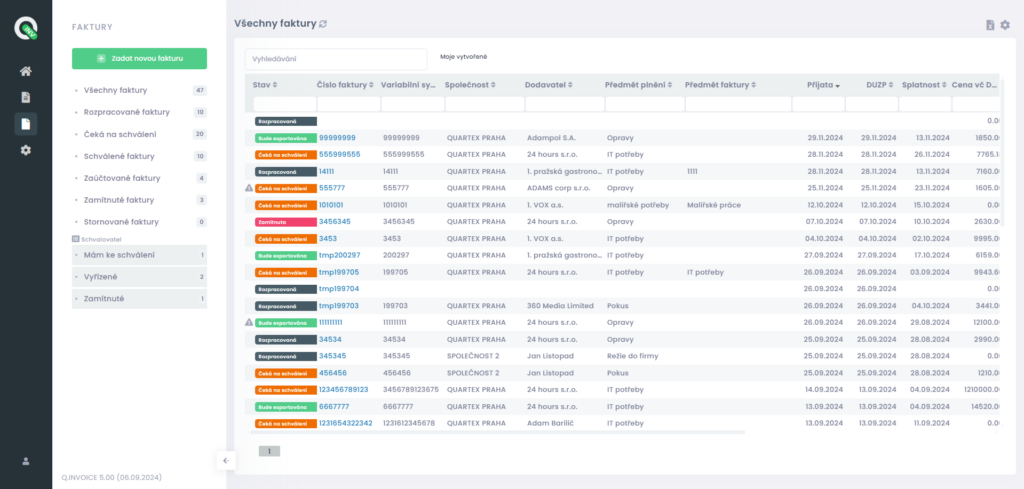
Benefits of a digital archive
- Clarity: No more searching through binders or different storage systems. Everything is in one place and clearly organized.
- Time savings: Find invoices instantly, without stress or wasted time.
- Fewer errors: Automation minimizes the risk of duplicate or incorrectly stored invoices.
- Eco-friendly solution: Digitalization reduces paper consumption and supports sustainability.
Take a step toward digitalization today 🚀
Forget about binders and scattered storage. Start using the benefits of a digital archive. With Q.Invoice, you will always have your received invoices at hand – clearly organized and secure.
Try Q.Invoice FREE and discover other features of this application.